Adjusting the tailstock pressure
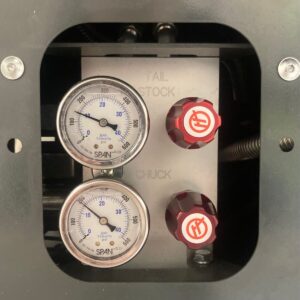
The hydraulic pressure regulator for the tailstock can be adjusted on the panel at the bottom left of the machine, as you look at the front.

Turning the red knob in the upper half of the regulator panel will adjust the amount of pressure exerted by the tailstock. Clockwise will result in more pressure, turn the knob anti-clockwise for less pressure.
Be careful when setting this value – too high can bend parts, too low can result in sub-optimal pressure. You may wish to use a dial indicator to assess the amount of deflection you are causing.
If the gauges read zero the machine is either asleep or in an alarm state. Press the Reset button on the control panel to wake the machine up or clear the error.
Do not set the pressure higher than 20 bar, or 300 psi.